Color map effect
Applies a color-map effect on an object or layer.
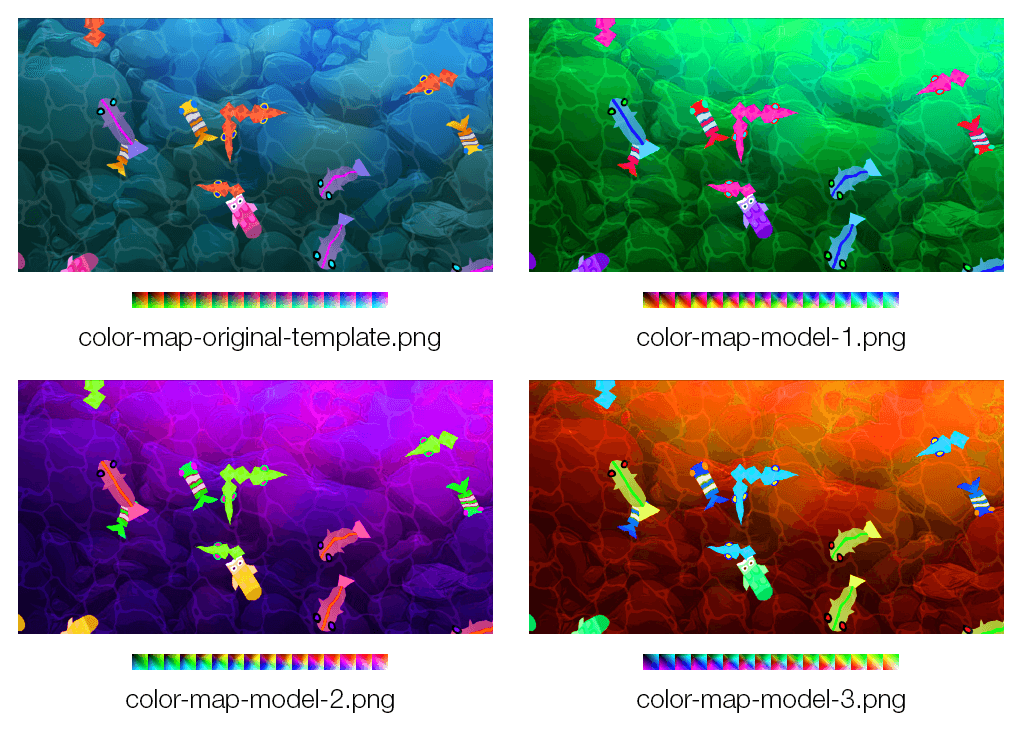
This works by modifying a reference "color image map" containing all possible colors.
Create your own color map
- Download the reference color map image:

- Use an image editor (like GIMP or Photoshop) to tweak the color the reference color image map with some filters. For instance, you can use GIMP Rotate Colors filter.
- Try some filters on your assets first to get an dea of the end result
- Once you found the right settings, apply the same filters to the reference color map image.
- Save it as a new file
- Use this new image as the color image map for the effect in GDevelop.
Try some ready-to-use color maps
- color-map-model-1.png :

- color-map-model-2.png :

- color-map-model-3.png :

The Mix parameter (in percent) sets how strongly the color map is applied: lower it to blend the original colors with the mapped ones, which is convenient to fade the effect in and out during the game.
Reference
All effects are listed in the effects reference page.